Deleting an Application
How to delete an application from the platform.
Deleting an application removes its ArgoCD Application, the Kubernetes namespace, and everything inside (pods, services, configmaps, secrets, PVCs, etc.). This cannot be undone.
If you don't have access to delete the namespace or the ArgoCD Application, ask your Platform Team for help.
In Scope
This guide deletes the following from the platform:
- The ArgoCD Application and the Application it manages.
- The namespace and all resources inside it (deployments, services, configmaps, secrets, ingress, PVCs, network policies).
Out of Scope
You'll need to manage these yourself — the platform delete won't touch them:
- Externally provisioned resources — cloud databases, DNS records, message queues, or anything provisioned outside the platform.
- Externally persisted state or actions produced by the service — e.g. rows written to an external database, messages published to an external broker, files written to external storage.
- Container images in JFrog — remove separately if desired.
- Observability data — historical logs, metrics, and traces stay in their respective tools.
- The source repository — archive or delete separately.
Delete Steps
1. Delete the app's platform folder
Open a PR against your .platform repo and delete the correct path for the scope of removal, then merge to main:
- To remove the application from all environments, delete
.platform/kubernetes/<app-name>/once. - To remove the application from only specific environments, delete only those environment subfolders, for example
.platform/kubernetes/<app-name>/dev,.platform/kubernetes/<app-name>/stg, or.platform/kubernetes/<app-name>/prd. Finding<app-name>: use the folder name under.platform/kubernetes/in your.platformrepo for that application/environment. If you're not sure, check the value passed to your application repo's deployment workflow asdirectory-name(orPLATFORM_NAMESPACE) and use that value. Do not rely on.platform/kubernetes/base/application.yaml'sname, because it can differ from the folder/namespace that must be deleted.
If your repository dispatches multiple sub-applications (see Monorepo Support), each has its own <app-name> and must be deleted separately — deleting one sub-application's folder does not affect the others.
You don't have to remove the application from every environment. To delete it from just one, keep the base .platform/kubernetes/<app-name>/ folder and delete only the matching .platform/kubernetes/<app-name>/<env>/ subfolder (e.g. .platform/kubernetes/<app-name>/dev/).
2. Delete the Application from ArgoCD (unless automated)
If vacuum-argo is set for the target environment(s), ArgoCD deletes the ArgoCD Application(s) and their resources automatically within about 15 minutes — skip to Step 3 to confirm.
If vacuum-argo is not set, delete the ArgoCD Application yourself (or ask a Platform Admin if you don't have access). Pick whichever path you're comfortable with:
vacuum-argovacuum-argo is a Platform Team setting that lives in .platform/organization/environments.yaml (per environment) or .platform/organization/organization.yaml (all environments). Developers don't typically edit these files — contact your Platform Team if you'd like it enabled.
- Argo UI (Recommended)
- via CLI
- Open the Argo CD UI for the target environment(s).
- Find the application by
<app-name>and click Delete. - Confirm when prompted.
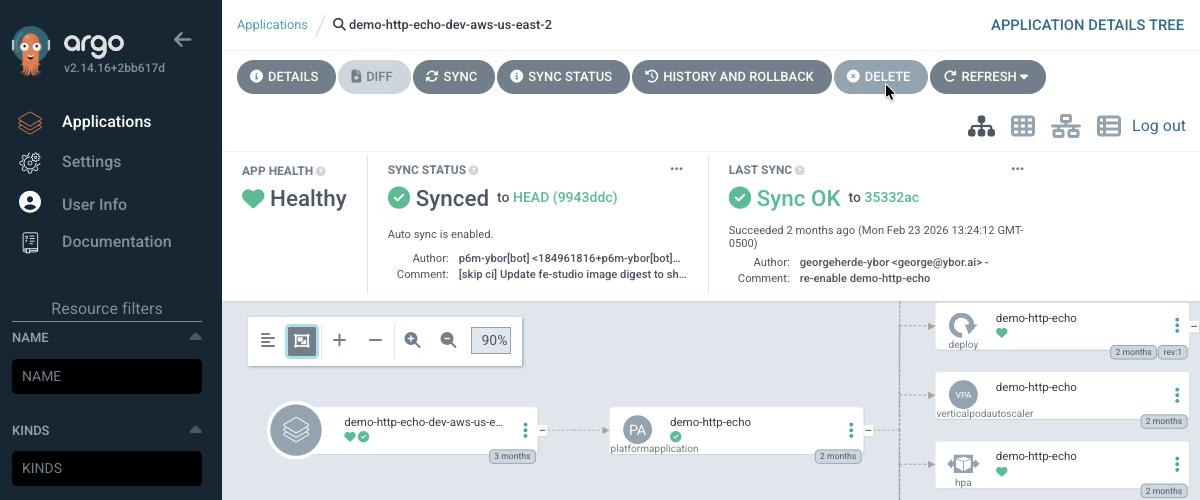
# Delete the Application via ArgoCD
argocd app delete <app-name>

# Or delete the namespace directly if you have cluster access
kubectl delete namespace <app-name>
3. Verify
- Argo UI (Recommended)
- via CLI
Open the Argo CD UI and confirm <app-name> no longer appears in the applications list.
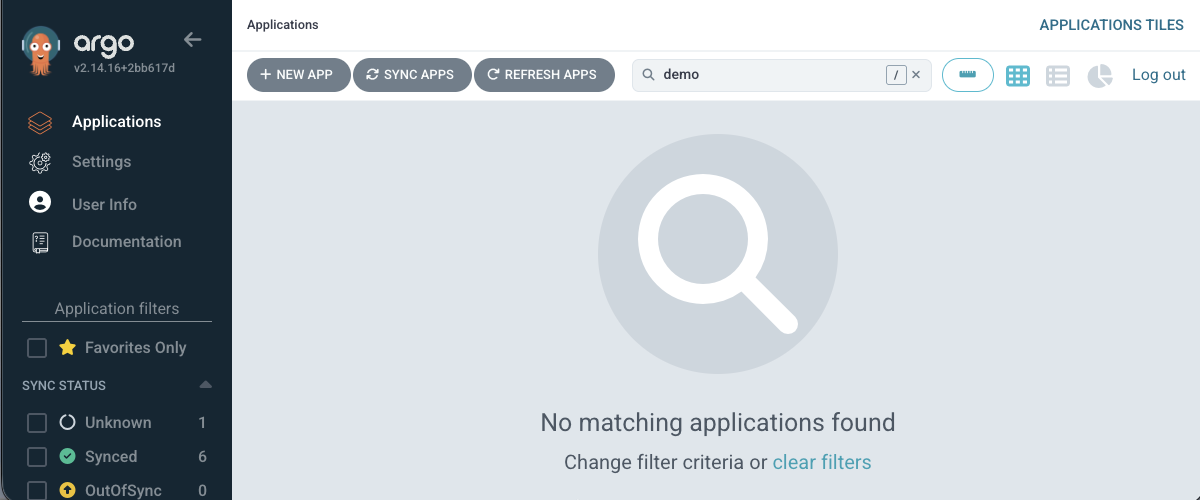
# Confirm the ArgoCD Application is gone
argocd app list | grep <app-name>

# Confirm the namespace has been removed
kubectl get namespace <app-name>
Rollback
If you deleted an application by mistake:
- Revert your PR to restore the
.platform/kubernetes/<app-name>/folder, or - Run another deployment to deploy a new version of the application.
In-cluster state (PVC data, secrets not backed by an external store) is gone once the namespace is deleted. You can recreate the deployment — not the data.